The Qbeast split-plane SaaS Architecture
A data lakehouse is a modern approach to data analytics built on a disaggregated, open stack. It is disaggregated in that it relies on an object store for data persistence and one or more query engines for query execution. Being open refers to the use of open file and table formats, along with interoperability across components from both vendors and the open source ecosystem.
At Qbeast, we develop technology that organizes the data layout of lakehouse tables to improve performance and reduce compute costs. The data layout refers to the files that make up a table and their contents. Organizing it means making deliberate choices about the number of files and what they contain, with the goal of maximizing query efficiency. We do this through clustering guided by an index tree, which lets us prune data significantly at query time and update table clustering incrementally as new data arrives.
This post is not about the indexing itself, though. It is about our implementation of data layout as infrastructure: the setup we developed to enable and support our customers with their lakehouse operations. We received requests to support all three major cloud providers — AWS, Google Cloud (GCP), and Microsoft Azure — and ultimately implemented support for all of them. Our goal was to centralize and automate as much as possible to reduce the complexity of managing multi-cloud deployments. To that end, we implemented a control plane using Crossplane.
Given widespread concern about data leaving the customer's account, we deploy directly into the customer environment. We currently offer two deployment modes: managed and provided. Because our components run on Kubernetes, customers can either provide us with a Kubernetes namespace (provided) or have us provision a cluster on their behalf (managed). In both cases, we are responsible for managing the Qbeast components ourselves.
With the control plane running in the Qbeast account and the data plane running in the customer account, we refer to this as a split-plane architecture. This post discusses the key architectural decisions and trade-offs we encountered in building it. We are still early in development and fully expect to adapt and refine our approach as we gain operational experience.
Building a control plane to support multiple clouds
Our customers run on all three major cloud providers, so we decided to support all of them: AWS, Azure, and GCP.
When choosing the tooling our SaaS would use to deploy into customer infrastructure, our first thought was a classical Terraform and Helm based solution, the setup we had relied on in our early deployments. At the time, the Crossplane project was maturing and gaining traction in the ecosystem, so we gave it a shot — first using it to manage part of our own infrastructure, then in real-world proofs of concept.
Crossplane offers a set of features that fit our needs remarkably well:
- API-first design: Crossplane extends the Kubernetes Custom Resource Definition mechanism with managed resources that map to cloud resources (a VPC, an object storage bucket) or Kubernetes-native objects (a service account, a Helm release). Deploying a resource becomes creating an object in the Kubernetes cluster where Crossplane is installed.
- Centralized resource state: Crossplane mirrors in Kubernetes the state of every resource it manages, embedding the status directly into the corresponding Kubernetes object. This makes it easy to understand the current state of a deployment at a glance.
- Reconciliation loop: Crossplane continuously drives the target resources toward the desired state, retrying until they conform.
- Native Kubernetes: Crossplane builds on the reliability of Kubernetes, so all the existing tooling for deploying and troubleshooting Kubernetes workloads applies.
- Multi-cloud coverage: all three major cloud providers are supported, covering every kind of resource we need — cloud storage, VPCs and networking, Kubernetes clusters, and more.
So why we chose Crossplane rather than Terraform? For one-off provisioning, Terraform would have served us perfectly well — it is mature and battle-tested. But we are not doing one-off provisioning; we operate long-lived deployments across many customer accounts, and each of them must stay healthy long after the initial rollout. Terraform's model is a plan/apply cycle driven from the outside, with a state file to store, lock, and protect per deployment. Crossplane inverts this: the desired state lives in the cluster as an API object, and the reconciliation loop enforces it continuously. That continuous enforcement — combined with getting a single Kubernetes API to build our SaaS on — is the key factor that tipped the decision.
The Control Plane API, which is the entry point of our SaaS, sits in front of our Crossplane cluster. It consists of an authenticated, REST-style HTTP API through which customer deployments are managed end to end.
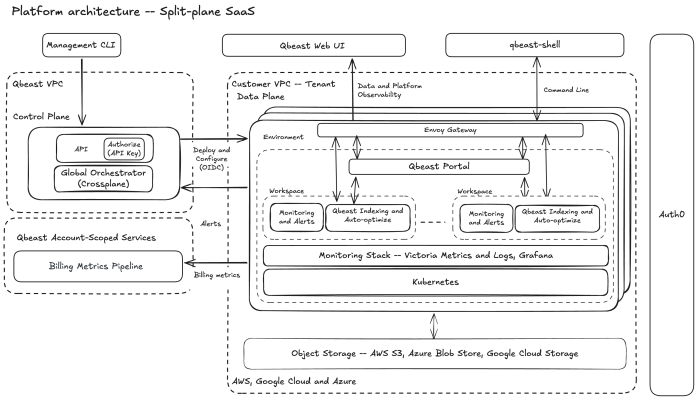
The figure above illustrates the main components of our architecture. We run the control plane on our Qbeast resources and manage deployments in the customer VPC. Lakehouse data lives in object-storage buckets that we connect to the Qbeast stack to manage the data layout. A customer can have multiple environments and workspaces, providing a logical separation to match internal organization.
Managed vs. Provided
We have created a simple structure on a small set of concepts to enable customers to map relevant aspects of their organization to the Qbeast deployment. These concepts are:
- Tenant: the customer organization.
- Environment: an infrastructure deployment within the tenant's cloud, which must contain a Kubernetes cluster. A tenant can have multiple environments, possibly across different cloud providers.
- Workspace: the Qbeast software stack powering the customer lakehouse. An environment can host multiple workspaces, isolated from each other — useful for separating the workloads of different teams.
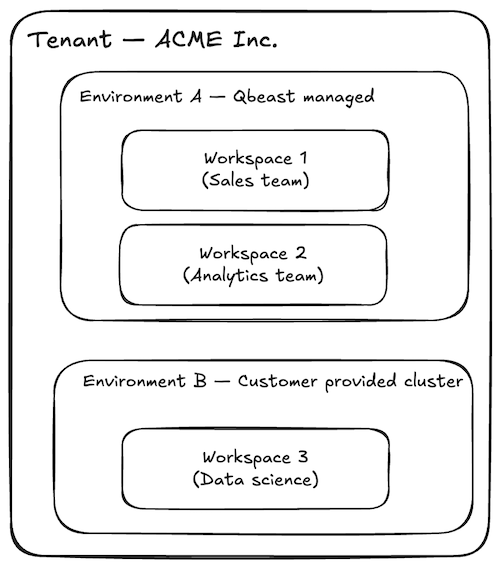
A tenant typically maps to a customer organization, and a tenant can have multiple environments in one or multiple clouds. An environment can have multiple workspaces mapping to the organization structure.
As the figure shows, we support two deployment scenarios for the environment:
- Managed by Qbeast: the Qbeast control plane installs a complete working environment from scratch — VPC, network stack, cloud storage, and a Kubernetes cluster running the full Qbeast software and observability stack. This scenario makes it easy to try Qbeast in full isolation within the customer's infrastructure.
- Provided by the customer: the Qbeast control plane connects to an existing Kubernetes cluster and installs the Qbeast software stack in a dedicated namespace. This is the more common scenario in practice, where customers already have infrastructure in place.
Both scenarios offer plenty of configuration options. For example, Qbeast can be configured to use an existing catalog and existing buckets containing the customer's tables.
Provisioning Qbeast in the customer account
We take security matters very seriously; it is a priority area for us. Consequently, it is essential to us that the authentication mechanism used to connect to customer accounts does not rely on shared secrets, such as a typical login/password scheme.
We found that OIDC, an open authentication standard, fits our requirements very well because it replaces shared secrets with short-lived, cryptographically signed tokens. Instead of storing a credential that the customer would have to issue, rotate, and trust us to protect, our Crossplane cluster presents a token proving its identity, and the customer's cloud verifies that token against a trust relationship configured once in their own IAM. Nothing secret ever changes hands, there is no credential to leak or rotate, and the customer stays in full control: they decide which identity to trust and can revoke it at any time. On top of that, OIDC is a widely adopted open standard, and all three major cloud providers support it natively through their own implementations:
- AWS: IAM role with an External ID
- Azure: managed and federated identities
- GCP: service account with workload identity federation
On our side, the control plane runs on Amazon EKS, and we lean on its built-in OIDC provider rather than operating our own. Every EKS cluster exposes an OIDC issuer that mints short-lived, signed tokens for the Kubernetes service accounts running our Crossplane controllers. On Azure and GCP, the customer federates their identity directly against that issuer. On AWS, the same workload identity is what assumes the cross-account role, guarded by the external ID. Either way, the credential that reaches the customer's cloud is a short-lived token tied to the workload itself, with nothing static to store on either end.
Before we can perform any operation on the customer's cloud infrastructure, the customer must grant access to our Crossplane cluster so that it can authenticate. This is done through the cloud provider's IAM features.
To make this step easy, we provide a CloudFormation template on AWS, a Bicep script on Azure, and a Terraform script on GCP. All three do the same thing: create an identity that only our Crossplane cluster can use to authenticate, and grant it the permissions required for the deployment operations.
It is worth being precise about what this grant actually contains, because it is the part security teams review most closely:
- A dedicated identity, not shared credentials. Each template creates an identity used exclusively by Qbeast — an IAM role on AWS, a user-assigned managed identity on Azure, a service account behind Workload Identity Federation on GCP. No existing customer credentials are touched, and no secret ever travels to us.
- Trust pinned to our control plane. Using OIDC and each cloud provider's native trust policies, the identity can only be used by our control plane. Authentication attempts from anywhere else are rejected.
- Permissions matched to the scenario. A customer-provided environment needs very little: the management identity is essentially allowed to describe the designated Kubernetes clusters and manage the workspace storage. A managed environment necessarily needs more, since we create VPCs, networking, and Kubernetes clusters on the customer's behalf — but the grant is still an explicit, reviewable policy in the template, not a blanket administrator role.
- Kubernetes RBAC as a second layer. In provided clusters, our access inside the cluster is bound to the dedicated namespace through a RoleBinding; the rest of the cluster stays out of reach.
- Auditable and revocable at any time. Everything is native IAM in the customer's account, so every action we take shows up in their audit logs — CloudTrail, Azure Activity Log, Cloud Audit Logs. And access can be revoked instantly by deleting the role, the federated credential, or the identity pool provider.
Artifacts - Helm Charts and Images
The Crossplane compositions set up the cloud infrastructure and install the software components of the Qbeast stack. We install each component through a Helm chart, which in turn instructs Kubernetes to start pods — and those pods need their container images to be downloaded.
In a multi-cloud setting, artifact availability raises several concerns:
- Protected assets: artifacts are proprietary and private, protected by license agreements, yet they must be automatically downloadable from any onboarded customer environment.
- Security: no tokens should be shared between the artifact repository and the customer environment.
- Performance: images can be large, so download time must be minimized.
We decided to centralize all our artifacts in the GitHub Container Registry (GHCR):
- Our charts and images are already built with GitHub Actions, so publishing them there was a natural fit.
- The artifact registries of all cloud providers can act as pull-through proxies for GHCR.
- We therefore set up a Qbeast artifact registry on each cloud provider, configured to pull artifacts on demand from the centralized GHCR repository.
The result is that customer environments pull their Docker images directly from the native artifact registry of their own cloud provider. Downloads are faster, and no security token is required — access is granted to the Qbeast artifact registry through the cloud provider's native IAM mechanisms.
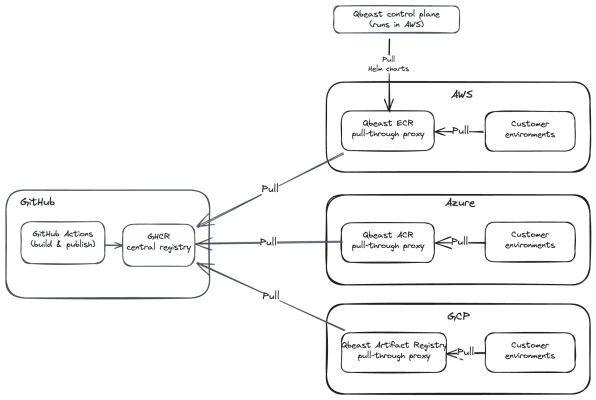
That covers image delivery. For Helm charts, the twist is that Helm operations run from the Crossplane cluster, so only that cluster needs to pull a chart before applying it to the target customer cluster. Our control plane runs in AWS, so it pulls the required Helm charts from the Qbeast AWS ECR (Elastic Container Registry), which proxies GHCR.
When things go wrong
A managed environment means dozens of cloud resources created in someone else's account, and provisioning at that scale fails in mundane ways: a quota is exceeded in the chosen region, a cloud API responds with eventual consistency, a permission turns out to be missing. This is where the reconciliation loop stops being an abstract feature and proves its value.
Crossplane does not abort a deployment halfway through and leave us with a broken state to repair. Each resource carries its own status, and resources that cannot be created yet are simply retried. When provisioning stalls, the conditions on the Kubernetes object tell us exactly which resource is blocked and why — the error message from the cloud provider is right there in the status. Once the cause is fixed (the quota raised, the permission restored), the deployment converges on its own; nobody has to re-run anything.
The same property covers drift. If a resource we manage is modified or deleted out-of-band, the reconciliation loop detects the divergence and restores the desired state.
Observability
Although Crossplane makes it easy to track the status of a deployment, all green doesn't mean everything is working well. A workspace can be fully reconciled and still be failing to do its job, so each environment can run its own observability stack that Qbeast support uses to inspect the installation and its core components.
We chose VictoriaMetrics and VictoriaLogs for this, rather than the more common Prometheus and Loki, for two reasons that matter specifically in a split-plane setting. The first is footprint: this stack runs inside the customer's account, on infrastructure they pay for, so it has to be lightweight. Both run comfortably as a single node — with a clustered mode available when an environment needs high availability — and use noticeably less CPU, memory, and disk than the equivalent Prometheus/Loki deployment (see benchmarks here and here). The second is cardinality: Kubernetes monitoring produces a lot of high-cardinality time series, since every pod has its own identity, and VictoriaMetrics is built for exactly that. Throughout, we make a conscious effort to keep the use of APIs compatible with the ones of Prometheus and Grafana, so that we avoid being locked into a niche ecosystem.
Collecting raw signals is only half the picture, so we ship our own Grafana dashboards tuned to the parts of the stack that actually tell us whether Qbeast is doing its job. We track the Qbeast backend, which runs the optimization workloads; the PVC shuffle storage that Spark relies on while those jobs run; and our MCP server. These give support a purpose-built view of the components that matter, rather than a generic Kubernetes overview.
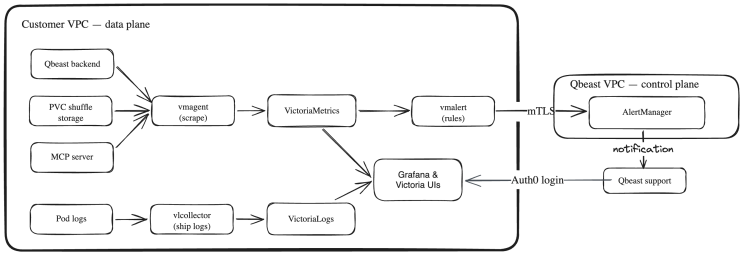
Keeping metrics and logs inside the customer environment is also a deliberate confidentiality decision, and logs are where it matters most. Metrics are mostly numeric series, but logs are unstructured text, and that text can incidentally carry sensitive material: table and column names, query fragments, file paths, identifiers, or snippets of actual data captured in an error message or stack trace. Treating that content as the customer's to hold is the only safe assumption.
So we apply to telemetry the same principle that keeps the customer's lakehouse data in their account: logs and metrics never leave the customer environment. They are not shipped to Qbeast, not copied into storage we control, and not retained or indexed on our side — which also means they cannot be exposed by a breach of our infrastructure, because they were never there.
When support needs to investigate, they reach these tools in place — Grafana as well as the VictoriaMetrics and VictoriaLogs UIs — through a login protected by Auth0, so that only authorized Qbeast accounts can connect. The data is read inside the customer's account, subject to their network controls and visible in their audit trail. This access is also easy to switch on and off, so customers can align it with their own policy — granting it for the duration of an investigation and revoking it afterwards, for example.
Alerting is the one place where something does cross the boundary, and we keep that crossing as narrow as possible. Alert rules are evaluated locally, inside the customer environment, against the local VictoriaMetrics instance. Only the resulting alerts — never the underlying metrics or logs — are sent out, to the central AlertManager running in our control plane, over a mutually authenticated TLS connection in which each customer cluster presents its own client certificate. From there, AlertManager groups alerts by tenant and cluster, routes them by severity, and today notifies our team on Slack, repeating the most severe ones more frequently until they are acknowledged.
Conclusion
Our data layout as infrastructure approach and present focus on the cloud required us to develop deployment and operations on the customer account to satisfy security while enabling an effective use of Qbeast. Building a SaaS that deploys into customer accounts across three cloud providers forced us to be deliberate about every small architectural choice. Crossplane gives us a single, Kubernetes-native way to describe and reconcile deployments on AWS, Azure, and GCP. OIDC-based identity federation removes shared secrets from the onboarding process entirely. Per-cloud artifact registries proxying GHCR deliver our software quickly and without token exchange. And the split-plane design keeps customer data — including its metrics and logs — inside the customer account at all times.
Like any typical software architecture work, we expect to have to adapt our choices as we learn from production experience and as requirements evolve. The current design and implementation automate many operational tasks, simplifying the work of provisioning and maintaining customer setups, which is desirable for a small organization like ours. We’re looking forward to learning more from customer use cases and evolving accordingly.